Website Accessibility in Israel: What the Law Actually Requires (IS 5568)
A plain-language guide to Israel's website accessibility law: who must comply, what IS 5568 and WCAG AA require, and why overlay widgets fall short.
Let me be honest with you: most business owners have heard "something about an accessibility law," installed a floating widget with a wheelchair icon, and moved on feeling covered. I understand the appeal — it takes five minutes and looks official. The problem is that in most cases it does not satisfy the legal requirements, and meanwhile accessibility lawsuits against websites are no longer a theoretical scenario in Israel. They are routine.
I've been working on website accessibility for years, and this article collects everything you actually need to know: who is obligated, what the Israeli standard really demands, what that means for your site in practice, and what genuine compliance looks like — as opposed to the "we installed a plugin" kind.
Who is required to make their website accessible?
The legal foundation is Israel's Equal Rights for Persons with Disabilities Law, together with the regulations enacted under it — the Equal Rights for Persons with Disabilities Regulations (Service Accessibility Adjustments). Regulation 35 of those regulations deals specifically with the accessibility of internet services, and it is what extends the accessibility obligation to websites.
The principle is simple: if you provide a service to the public, and your website is part of how the public receives that service, the website must be accessible. That casts a very wide net:
- Businesses selling products or services through their site — online stores, obviously, but also brochure sites with a contact form
- Professional service providers: law firms, accountants, clinics, salons
- Restaurants and cafes that display a menu or take orders online
- Public bodies and government entities, which face even stricter requirements
The regulations do include certain exemptions and qualifications, some of them tied to the scale of the business — but I strongly recommend not banking on an exemption without checking with a professional. Exemptions come with specific conditions, and some still require you to take certain actions (such as publishing an accessibility statement). The assumption "we're a small business, this doesn't apply to us" is exactly the assumption that ends in a demand letter from a lawyer.
What is IS 5568, and how does it relate to WCAG?
Israeli Standard 5568 (ת"י 5568) is the standard that defines what an "accessible website" means for the purposes of the regulations. The good news: the Standards Institution of Israel did not reinvent the wheel. The Israeli standard essentially adopts WCAG — the Web Content Accessibility Guidelines — the international guidelines for web content accessibility developed by the W3C, the body that standardizes the web itself.
WCAG defines three conformance levels: A (basic), AA (intermediate), and AAA (strict). The requirement in Israel, as in most of the Western world, is conformance at level AA. In other words: if your site meets WCAG at level AA, you are on the right track for the Israeli standard as well.
This carries an encouraging implication: accessibility is not some "Israeli invention" that requires special local solutions. A site built properly to accepted international standards is an accessible site. Anyone telling you that you need a "special Israeli solution" in the form of this or that plugin is probably selling you something.
What does AA mean in practice? Ten real-world examples
"Level AA conformance" sounds like a contract clause. In practice it is a list of very concrete requirements. Here are ten of the central ones, in human language:
- Full keyboard navigation. Everything a user can do with a mouse — menus, buttons, forms, popups — must also be possible with a keyboard alone. People with motor disabilities, and screen reader users, simply don't use a mouse.
- Alternative text for images (alt text). Every image that conveys information needs a text description a screen reader can announce. A banner image saying "50% off everything" with no alt text is, for a blind user, an empty rectangle.
- Sufficient color contrast. Light gray text on a white background looks "clean" to a designer but is unreadable for people with low vision — and for anyone checking their phone in the sun. The standard defines minimum contrast ratios between text and background.
- Forms with clear labels. Every form field needs a label programmatically associated with it, and error messages must explain what went wrong and how to fix it — not just turn the field red.
- Captions for videos. Video content with speech needs captions so that deaf and hard-of-hearing users can consume it.
- A proper heading structure. Headings (H1, H2, H3) must reflect the logical structure of the page, because screen reader users navigate through them. A heading that is really just large bold text doesn't count.
- Links that explain themselves. "Click here" and "read more" are meaningless when announced out of context. A link should say where it leads.
- The ability to stop moving content. Carousels, animations, and auto-rotating sliders must be pausable. Content in constant motion is a genuine barrier for people with attention and cognitive disabilities.
- Text resizing without breaking the page. A user who enlarges the text in their browser should get a readable, usable page — not a salad of overlapping elements.
- Screen reader compatibility. Interactive components — accordions, modal dialogs, tabs — must be built so a screen reader understands what they are and what state they're in. That requires proper semantic code, and sometimes judicious use of ARIA.
Notice the pattern: every one of these requirements concerns how the site is built. Which brings us to the most important point in this article.
Why an overlay widget doesn't solve your problem
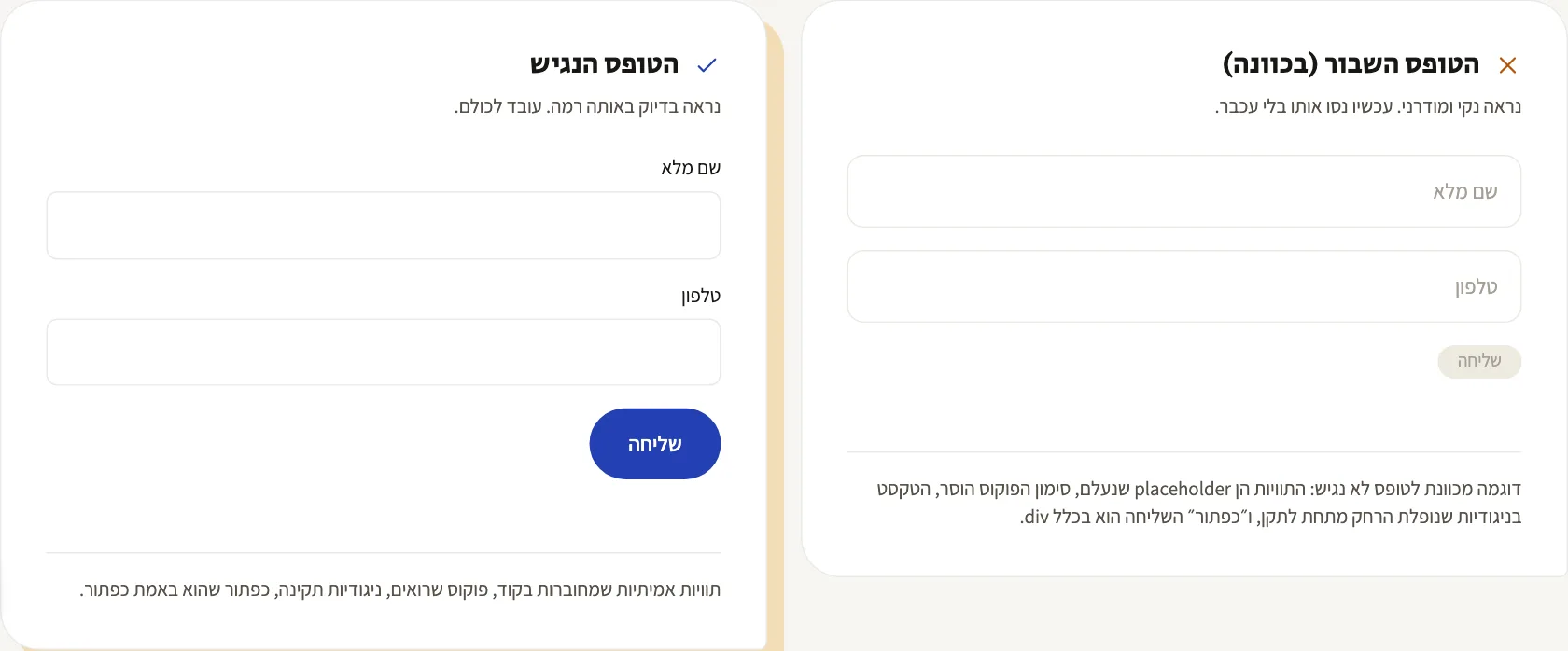
Floating accessibility overlays — those widgets that add a corner icon with options like text enlargement and contrast toggles — are the most common "solution" in the Israeli market. They are also, in most cases, not enough.
An overlay can change how your site looks. It cannot change how your site is built — and most of the standard's requirements are about exactly that.
Look back at the list above: a widget cannot add meaningful alt text to your images, because it has no idea what's in them. It cannot fix a form built without labels, cannot reorganize a broken heading structure, and cannot turn a menu that doesn't work with a keyboard into one that does. It is a cosmetic layer over the existing code.
Worse — some overlays actively interfere with assistive technology users, because they manipulate the page in ways that clash with screen readers users have already configured exactly how they need them. And the legal bottom line: installing a widget does not, by itself, confer conformance with the standard, and accessibility lawsuits are filed against sites with a prominent accessibility icon in the corner all the time.
That doesn't mean overlays have no place — some of what they offer is a nice addition on top of a properly accessible site. An addition, though. Not a substitute.
What happens if you don't comply? On legal exposure
Here's the part that makes business owners sit up straight. The Equal Rights for Persons with Disabilities Law allows for statutory compensation — meaning monetary damages awarded without any need to prove actual harm. A person with a disability who encounters an inaccessible website does not need to show they lost money or suffered tangible injury; the discrimination itself is the cause of action.
The practical consequence: a whole field of website accessibility litigation has emerged in Israel, and some plaintiffs scan sites systematically. A business with an inaccessible website is an easy target — the check is simple, the violation is easy to demonstrate, and the compensation doesn't require proof of damages. I'm deliberately avoiding specific figures, because they vary between cases and you should get current legal advice; but trust me that the cost of proper accessibility work is significantly lower than the cost of dealing with a lawsuit, even one that ends in a settlement.
Beyond the legal angle, there's plain business logic: people with disabilities are a large customer base, and an inaccessible site is a site voluntarily turning customers away. There's a bonus, too: many accessibility principles (semantic structure, alt text, heading hierarchy) overlap with the principles of good SEO. An accessible site is almost always a better-ranking site.
The accessibility statement: the page your site must have
Part of the requirements is publishing an accessibility statement on the site — a dedicated page, itself accessible and easy to find (usually linked from the footer), which details:
- The site's accessibility status — which adjustments it meets, under which standard and at what level
- Which parts are not accessible, if any, and why (for example, a third-party component you don't control)
- Contact details for the accessibility coordinator or responsible person — name, phone, email — so a user who hits a barrier knows who to turn to
- Physical accessibility arrangements, if the business has a branch or office serving the public (accessible parking, wheelchair access, and so on)
- The date the statement was last updated
An accessibility statement is not marketing copy, and not a file to copy-paste from another site. A statement declaring "this site is fully accessible" when it isn't can actually make your position worse — it documents, in your own words, that you knew what was required.
A practical checklist: where to start
If you've read this far and want to know what to do tomorrow morning, here's the order of operations I recommend:
- Audit the current state. Run an automated scan (tools like Lighthouse or WAVE give a free first impression), but remember automated testing catches only a portion of the issues. Manual testing with a keyboard and a screen reader is the real test.
- Navigate your site with a keyboard only. Try reaching every menu, button, and form without touching the mouse. If you get stuck, so do your users.
- Check your images. Do meaningful images have descriptive alt text? Are decorative images marked as such?
- Check contrast. Free tools will measure text-to-background contrast ratios against the standard.
- Go through your forms. Labels, clear error messages, and the ability to complete and submit with a keyboard.
- Handle video and moving content. Captions for videos, a pause control for carousels.
- Write and publish an accessibility statement that reflects the true state of things, including contact details.
- Set up ongoing maintenance. Accessibility is not a one-time project — every new page, banner, or plugin can break it. Fold an accessibility check into every significant update, and if your site accumulates technical issues over time, proper fixes and maintenance work is the place to address that too.
And if your site is old, built on an outdated template, or full of code nobody understands anymore — sometimes rebuilding it as an accessible site from the ground up is cheaper and simpler than retrofitting accessibility onto what exists. That's a calculation worth making with open eyes.
The Part People Break Without Noticing: Embedded Widgets
Plenty of sites that were made properly accessible break a week later for the same reason: someone embedded a third-party component. A booking form, a chat widget, a map, a video player, a calculator, a payment module.
These usually sit inside an iframe, which makes them a world of their own — your code doesn't control them, and your accessibility work doesn't apply to them. If the chat can't be closed by keyboard, or a booking can't be completed without a mouse, that counts as a blocker on your site, even though the code isn't yours.
What I check on every embedded component before it goes in:
- Can you enter and leave it by keyboard alone, without getting trapped inside it?
- Can you complete the action it exists for — book, pay, send — without a mouse?
- Does it have alternative text or a description for someone who can't see it?
- If it fails to load, is there still another way to complete the action?
If the answer to any of those is no, there are three options: ask the vendor for an accessible version (sometimes one exists), switch vendor, or leave a clear alternative route — phone, WhatsApp, a plain form — that completes the same action. The third is usually the quickest, and it's simply good service anyway.
The Files You Upload Count Too: PDFs, Menus, and Catalogs
A common blind spot: the site itself was made properly accessible, but the menu is a photo uploaded as a PDF, the price list is an image of a table, and the catalog is a scan of the printed brochure. To a screen reader, all of these are blank pages — and they are part of the service your site provides, exactly like any other page on it.
The order of priorities I recommend: first, whatever can live as a regular page on the site should live as a regular page. A restaurant menu as HTML text is accessible, indexable by Google, and quick to open on a phone — three birds on the same page. If a PDF is genuinely needed (a printable document, an official form), it should be generated from a text file — Word or a design tool with accessible export — not from a scan, so the text inside it can be selected and read aloud.
And wherever an inaccessible file remains, the rule from the previous section applies here too: a clear alternative way to get the same information — a parallel text page, or at least a phone number someone answers.
Questions That Keep Coming Up
"My site is on Wix/Shopify — does that cover me?" No. The obligation sits with the site owner, not the platform. A good platform makes the work easier because some of the underlying structure is already accessible, but the content you uploaded, the theme you picked and the apps you added are yours.
"My site is small, five pages. Even then?" Yes. Size doesn't change the obligation — it only changes how much work there is. Five pages without complex forms is usually a short job.
"I made the site accessible three years ago. Does that still hold?" Depends what happened since. Every new page, banner, plugin and theme change can break existing accessibility. If nobody has touched the site, you're probably fine. If a store, a form or a popup went in, it's worth re-checking.
"Who is supposed to sign the accessibility statement?" The statement sets out the state of the site and how to raise an issue, and responsibility for it sits with the site owner. If someone offers you a generic statement without actually reviewing the site, it isn't worth the file it's written in.
"I received an accessibility complaint. What now?" That's a different situation with its own order of operations — I wrote a separate guide on it: what to do in the first week after an accessibility complaint.
Bottom line
Website accessibility in Israel is a legal obligation, but I'd suggest looking at it another way too: it's an opportunity to build a better site — one more people can use, one Google likes more, and one that isn't waiting for a demand letter in the mail. A floating widget won't do the job; professional work on the code, content, and structure will.
Feeling like your site isn't there yet? I offer a professional accessibility audit and remediation to IS 5568 — get in touch and we'll go through it together, no jargon and no scare tactics.
More from the blog
- Technology
Website Hosting: How to Choose, What to Watch For, and When It's the Real Problem
How to choose website hosting: a one-minute test that exposes a slow server, seven checks before signing, and when a static site is the better answer.
6 min read - Performance
A 100 PageSpeed Score: How a Fast Website Generates More Leads (and What's Killing Yours)
What actually slows small-business sites: bloated builders, heavy images, fonts and widgets — what to fix without a rebuild, and when rebuilding pays.
7 min read - Process
How to Choose a Web Developer: 9 Questions to Ask Before You Sign
Nine questions to ask before commissioning a site: who owns the domain and code, what happens after launch, accessibility and speed, and what if they vanish.
7 min read
Tell me what you're building.
A short message is enough. I'll get back within a business day — with a real answer, not a sales script.