WordPress Site Hacked? The Order of Operations for the First Hour
A hacked WordPress site: what to do in the first hour, how to clean it without deleting the site, what to check in Google, and why it happened.
It usually surfaces in the evening, and the symptom sounds roughly like this: "our site is redirecting to some gambling site in Japanese." Or "Google says our site is dangerous." Or, the quieter and more dangerous version: "the site looks fine, but something odd is showing in the search results."
So before anything else: this happens to a lot of sites, it's almost never personal, and in most cases it's fixable. But the order of operations matters, because some of the instinctive reactions actively make the cleanup harder.
Three Things Not to Do
Don't delete the site. The temptation is understandable — wipe it and start clean. But you've also deleted the evidence: which file changed and when, and how exactly they got in. Without that you'll close the current hole and keep the same hole for next time.
Don't restore a backup and go back to business. A restore returns you to the point where the weakness still exists. If you haven't updated and haven't closed the way in, you'll be breached again — sometimes within days.
Don't assume it's only cosmetic. A hack you can see is the less dangerous kind. The version worth worrying about is the one you can't: code that injects links only for visitors arriving from Google, or a new admin user sitting quietly.
The Order of Operations
1. Put the Site in Maintenance Mode, Don't Take It Down
Maintenance mode stops the damage to visitors while leaving you access to work. Taking it fully offline hurts your traffic, your standing with Google, and your own ability to inspect what's happening.
2. Change Passwords — All of Them, Not Just the Site's
WordPress admins, the database user, the hosting account, FTP/SSH, and the email address the password reset is wired to. Plenty of breaches actually start at the email account or an infected local machine, not at the site.
3. Check Who the Users Are
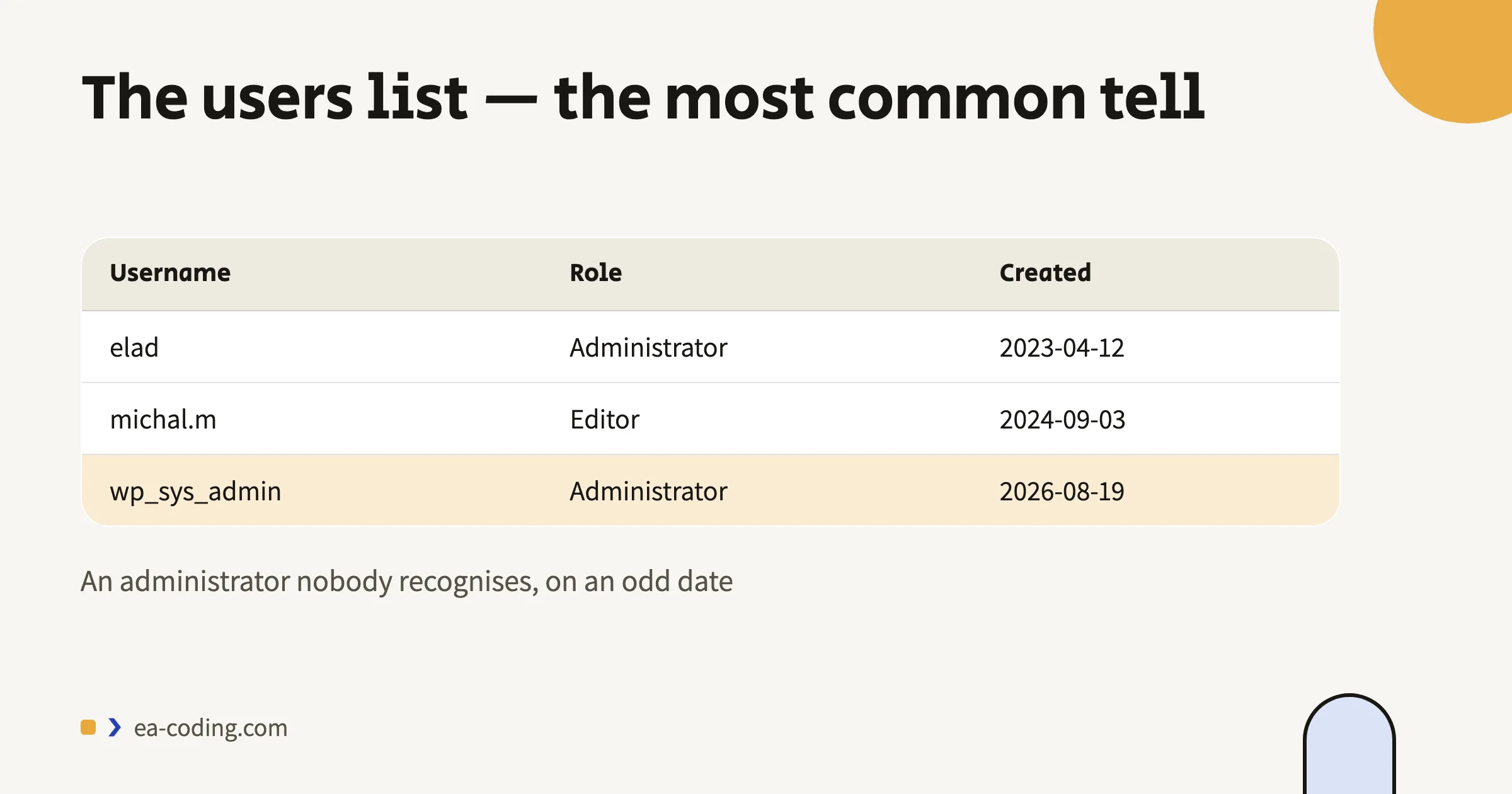
In the WordPress users list — is there an administrator you don't recognise? Created on an odd date? That's the most common tell. Delete them, then also check users who look familiar but changed role.
4. Identify What's Infected
Fastest route: compare against a clean source. WordPress core and plugins from the official repository can be downloaded again — any core file that differs is immediately suspect. What needs a human eye is wp-config.php, the uploads folder (which should contain no PHP files at all), and the theme files.
5. Clean — or Replace
For core and plugin code: delete and reinstall from an official release. That's faster and safer than cleaning by hand. The theme and the content need judging on their merits. And any plugin no longer in use, or pulled from the repository, gets deleted entirely rather than just deactivated. A deactivated plugin still sits on the server.
6. Update Everything, Then Close the Door
Core, theme and plugins to their latest versions. Then: two-factor authentication for admins, login attempt limits, and correct file permissions.
7. Check What Google Thinks
Search Console has a "Security issues" report. If the site was flagged, submit a review request after cleaning. It's also worth running a site: search to see whether pages you never created have appeared — that's the quickest way to spot injected spam. I explained how to read that in the Google indexing guide.
A clean site that isn't updated isn't a secure site — it's a site that hasn't been breached again yet.
Why It Happened
Almost always one of four:
- A plugin or theme that wasn't updated. The overwhelming majority. A vulnerability gets published, and automated scans find sites that didn't update — not because anyone picked you, but because they scanned everyone.
- An abandoned plugin that no longer receives security updates at all.
- A weak or reused password that also exists somewhere else.
- Poorly isolated shared hosting, where one infected site infects its neighbours.
Note what isn't on that list: "WordPress isn't secure." WordPress runs a substantial share of the internet and receives security updates at a good pace. What gets breached is almost always what surrounds it, and what wasn't updated.
Keeping It From Recurring
- Regular updates, on a fixed rhythm. Not "when someone remembers".
- Automatic backups stored off the server — a backup on the same server gets infected along with it.
- Fewer plugins. Every plugin is another door.
- Two-factor authentication for anyone with admin rights.
- Simple monitoring that alerts when a core file changes.
That's exactly what goes into fixes and ongoing maintenance, and it's the difference between a site that falls over once a year and one that doesn't.
The Fifteen Monthly Minutes That Save This Whole Article
If you maintain the site yourself — here's the minimal monthly routine. Set a reminder; it genuinely takes a quarter of an hour:
- Updates (5 min): core, theme, plugins. Backup first, then update.
- Backup check (3 min): not just that the backup ran — that it opens. An untested backup is hope, not a backup.
- User list (2 min): any administrator you don't recognise? A role that changed?
- Quick scan (3 min): a
site:search on Google for pages you never created, and a glance at the Security report in Search Console. - Delete what's unused (2 min): a plugin that's been deactivated for two months isn't coming back — delete it. Every plugin is a door.
This doesn't replace professional maintenance for a business site that earns money — but it's the difference between a site somebody watches and a site quietly waiting for the next automated scan.
The Bottom Line
A breach isn't the end of the world, but it is a wake-up call: it says something in the maintenance routine wasn't working. The cleanup is the short part. What decides whether it happens again is what you do in the week after.
Site hacked right now, or you're not sure? Send me a message — I'll go through it, tell you what's infected and what's clean, and clean and harden it end to end if needed.
More from the blog
- Technology
Website Hosting: How to Choose, What to Watch For, and When It's the Real Problem
How to choose website hosting: a one-minute test that exposes a slow server, seven checks before signing, and when a static site is the better answer.
6 min read - Performance
A 100 PageSpeed Score: How a Fast Website Generates More Leads (and What's Killing Yours)
What actually slows small-business sites: bloated builders, heavy images, fonts and widgets — what to fix without a rebuild, and when rebuilding pays.
7 min read - Accessibility
Website Accessibility in Israel: What the Law Actually Requires (IS 5568)
A plain-language guide to Israel's website accessibility law: who must comply, what IS 5568 and WCAG AA require, and why overlay widgets fall short.
9 min read
Tell me what you're building.
A short message is enough. I'll get back within a business day — with a real answer, not a sales script.