Got a Website Accessibility Complaint? What to Do in the First Week
It almost always starts in the same order: first the letter arrives, and then the question - "but we have an accessibility widget on the site, don't we?"
So first - breathe. This isn't the end of the world, and it also isn't something you fix in ten minutes. Here's the order the steps are worth doing in, one after another.
One clarification before we start: I'm a developer, not a lawyer. Everything here is the technical side of the story - what's broken on the site and how it gets fixed. For the legal side you'll want someone who does that for a living, and preferably early rather than late.
Three Things Not to Do in the First Moment
Don't take the site offline. That's the instinctive reaction for a lot of business owners - no site, no problem. In practice you've done two kinds of damage: you've lost the traffic and the leads, and you've also erased your own best record of what the site actually looked like at the moment of the complaint.
Don't install a floating widget and declare it fixed. This is the biggest temptation, because it takes five minutes and comes with an icon that looks official. The problem is that a widget hovering above your site doesn't change the code underneath it, and anyone reviewing the site seriously will see that within a minute. I went into this in depth in the guide to accessibility plugins and the guide to Israel's accessibility law, but the bottom line is simple: the widget adds a layer, it doesn't repair the one below it.
Don't ignore it. A complaint that goes unanswered doesn't disappear, and it doesn't improve with age either. Even if your answer is "we're reviewing this and will come back to you," it's better that it goes out.
What to Do, in Order
1. Document the Current State, Today
Before anyone touches a line of code - screenshots of the main pages, desktop and mobile, with the date. If you have access to Google Analytics or Search Console, export the period as well. It sounds bureaucratic, but the moment you start fixing things the previous state disappears, and you will want to be able to show what was there and what you changed.
2. Find What's Actually Broken, Not What the Tool Says
Automated tools (Lighthouse, axe, WAVE) are a good starting point, but they only catch a portion of the problems. The checks that surface most of what matters need no tools at all:
- Keyboard only. Unplug the mouse. Can you reach every link, every button and every form field with Tab? Can you see where the focus is at any given moment? Can you close a popup without a mouse?
- Zoom to 200%. Does the text grow, or does everything break?
- Forms. Does every field have a permanent label, or just a placeholder that vanishes the moment you start typing? Do error messages say what exactly went wrong?
- Images. Do images that carry information have real alternative text, or "image1.jpg"?
- Video. Are there captions?
Write down everything that fails, in one list. That list is worth more than any automated report, because it describes what a real person experiences.
3. Understand the Gap Against the Requirement
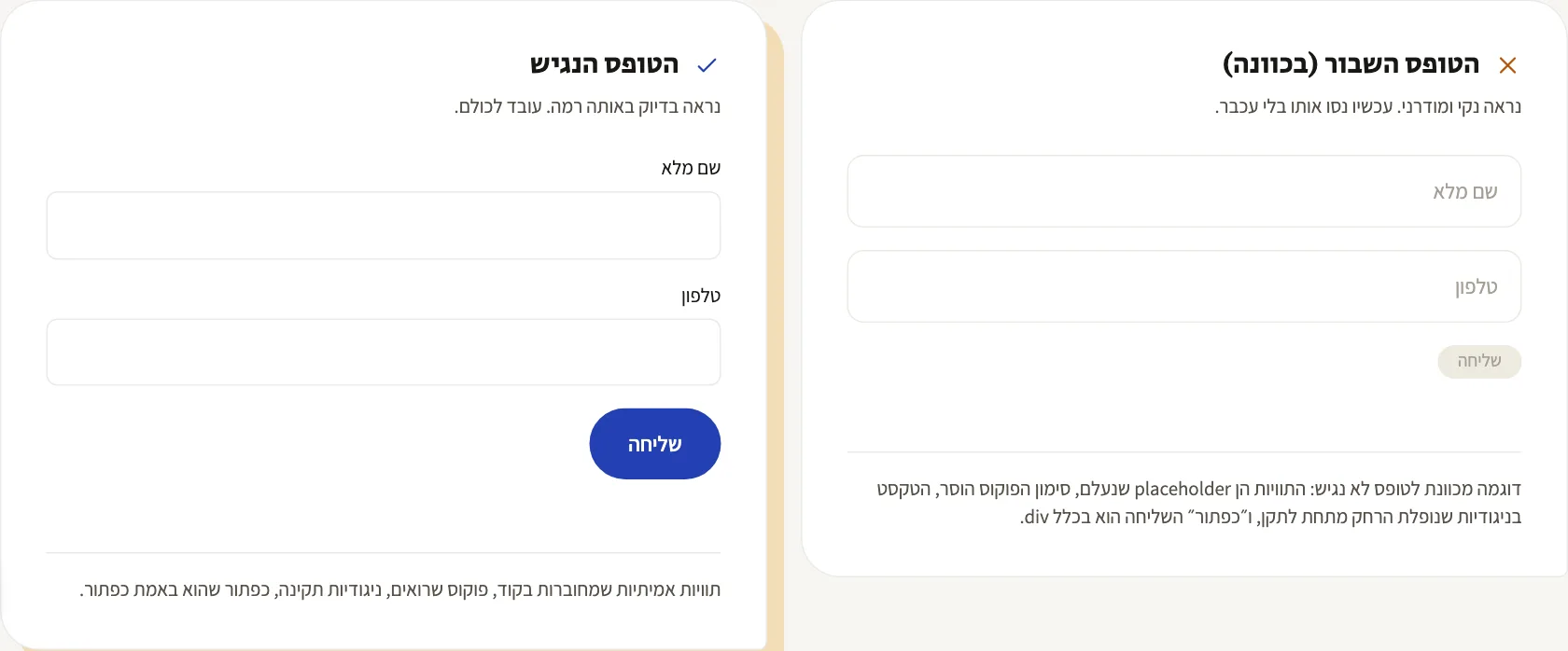
In Israel the relevant standard is IS 5568, which is based on WCAG 2.1 level AA. It isn't a document you need to read cover to cover - you need to know which clauses actually touch your site. A five-page brochure site and an accessible store checkout are two jobs of completely different scale.
4. Fix It in Code, in Priority Order
Not all fixes are equal. If you have two weeks, this is the order I work in:
- Hard blockers - anything that prevents completing an action: a form you can't fill in by keyboard, a popup that won't close, a menu that won't open.
- Navigation and structure - correct heading hierarchy, consistent navigation, a focus state you can see.
- Forms - labels, error messages, and the link between a field and its error.
- Contrast and alt text - the easiest to fix, which is exactly why people start here. Don't start here.
A good accessibility fix doesn't add a layer on top of the site. It changes the site itself, which is also why it doesn't vanish with the next template update.
5. A Real Accessibility Statement
Not a template you downloaded and swapped the company name into. A statement that describes the actual situation: what has been made accessible, what hasn't yet, how to contact you about it, and when it was last updated. A statement promising full accessibility on a site that isn't accessible is a problem in its own right. Here's how to write one, template included.
6. Keep a Record of What Was Fixed and When
The list of fixes, the dates, and a re-test at the end. If the process drags on, being able to show that you acted methodically and immediately - rather than six months later - is worth a great deal.
How Long This Takes
Entirely dependent on what you found in step 2. A standard brochure site without complex forms is usually a matter of days. A site with a customer account area, a store or a booking system is a matter of weeks, because every screen that involves user input needs checking on its own.
That said - the overwhelming majority of problems I find are repeats: the same forms, the same popups, the same menus. Once they're fixed at the template level, they close across the whole site at once.
How to Know You Actually Closed It
This is the part most people skip, and then discover six months later that the fix didn't hold. Re-testing isn't a formality - it's what turns "we fixed it" into "we can show we fixed it".
Run the same list from step 2, from the top. Same checks, same pages, after the work. If a check that failed before passes now, note the date. If it still fails, it isn't fixed, no matter who said it was.
Test journeys, not just individual pages. Accessibility breaks between pages rather than inside them: homepage, through the form, to the thank-you screen. If you couldn't finish the journey by keyboard alone, it isn't accessible, even if every page passes on its own.
Check on a real device, not only in a tool. A green automated report after the fix is a good sign, not proof. Five minutes with a keyboard and with text enlarged tells you more.
Keep the result in writing. What was checked, when, what was found, what was fixed. A one-page document. If the process drags on, that's precisely the document showing you acted methodically.
Set a date for the next check. Accessibility isn't a state, it's maintenance: every new page, banner, plugin and theme change can break it again. Once a quarter is a sensible rhythm for most sites.
The Bottom Line
The complaint isn't the problem, it's the moment the problem became visible. The site wasn't accessible the week before either - nobody had put it in writing.
The worst thing you can do right now is look for whichever fix appears fastest. The best thing is to go over the site properly once, fix it in code, and come out of it with a site that genuinely meets the requirement - including an accessibility statement you can stand behind.
Got a complaint and you're not sure where your site stands? Send me the URL - I'll go through it and tell you what's broken, what's critical, and what can be fixed this week.
More from the blog
Is an Accessibility Plugin Enough to Comply With Israeli Law?
A floating accessibility widget doesn't make a site comply with IS 5568. What the widget really does, where it fails, why it sometimes hurts, and what does cover you.
7 min readHow to Write a Website Accessibility Statement in Israel (With a Template)
The accessibility statement under Regulation 35: what the regulations require in it, where to put it, what never to write, and a template you can adapt to your site.
7 min readHow Do You Back Up a Website Properly? What, Where, and How Often
A backup that actually saves you: what must be in it (not just files), where never to store it, how often by site type - and how to know it works at all.
6 min read
Reaching me is the easy part.
A few lines in the form if you prefer writing - or straight to the channel you already use. Either way, it's me answering.