Who Actually Holds Your Website? The Domain, Hosting and Access Checklist
Domain in the developer's name? Passwords with someone who no longer answers? The checklist that proves your site is really yours — and what to do if it isn't.
There's a kind of fault that doesn't look like a fault until it becomes a disaster: the site works perfectly, and then one day something needs changing — and it turns out you have access to nothing. The domain is registered to the guy who built the site six years ago. The hosting is on the credit card of someone who left. The admin password — "I think the designer has it."
This isn't rare. It's one of the first things that surfaces in every site rescue, and it's usually what eats the first week. Here's how to check it isn't your situation, and what to do if it is.
The Checklist: Five Things That Must Be in Your Name
1. The domain. The most important asset — it's the address every customer knows. Check who's listed as owner and administrative contact, and which registrar manages it. If you don't know, a free WHOIS lookup will show you at least the registrar. The email attached to the registrar account must be yours — it's the one that receives renewal notices.
2. The hosting account. Who pays, and who can log in. Hosting registered under the developer's account looks convenient until they stop paying — or stop answering — and the site disappears without notice.
3. The admin system. An administrator user in WordPress (or whatever you have) in your name, with a password you know and two-factor authentication tied to your phone. Not the developer's, not the designer's.
4. The code and the backups. Where backups are kept and how to restore them without the developer. On a custom site — where the code lives (a Git repository? a folder?) and whether you have access. A backup that sits only on someone else's computer isn't your backup.
5. The surrounding accounts. Google Search Console, Google Analytics, the Google Business Profile, Tag Manager, the ad account, the mailing platform. Each needs at least one owner who is you — not merely an "editor".
The Ten-Minute Check
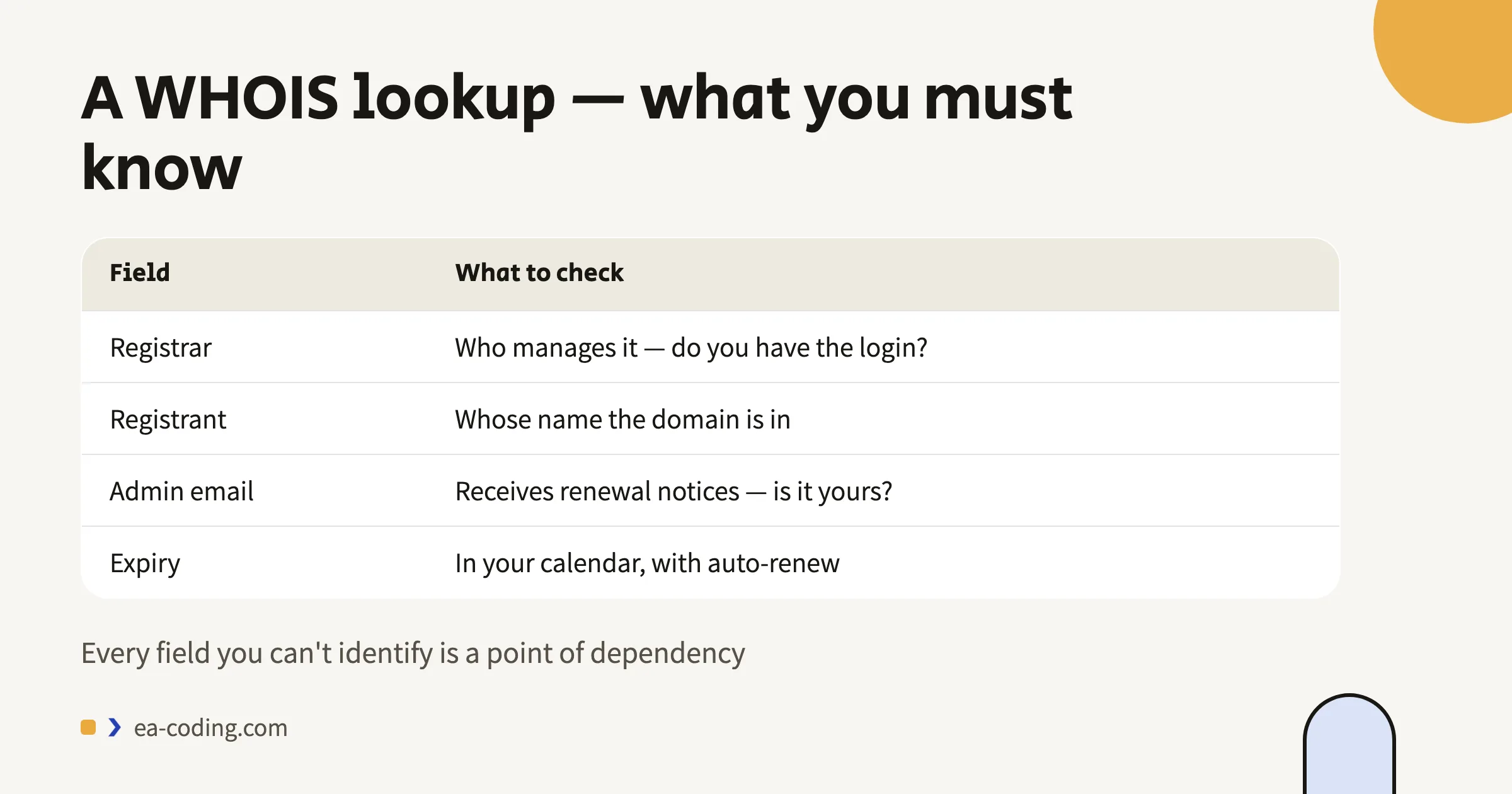
- Look up the domain in a WHOIS service. The registrar and the expiry date should be known to you.
- Try logging in to the registrar account. If you don't know how — that's your answer.
- Try logging in to the hosting. Same.
- Log in to the admin system with a user that's yours, and confirm it's an administrator, not an editor.
- Open Search Console and the Google Business Profile, and confirm you're listed as owner.
Every step that fails is a point of dependency. Write it down.
A site you pay for but can't log in to isn't yours. It's rented — on terms nobody agreed to.
What to Do When Something Isn't in Your Name
The developer is available and perfectly fine. Most cases. Ask for an orderly transfer: the domain to a registrar account of yours, the hosting to your account, a new administrator user, and a list of access credentials. A decent developer does this without drama — usually they don't want to be responsible for your assets either.
The developer isn't answering. First make sure the domain isn't about to expire — that's the urgent part. Then: registrars have procedures for transferring ownership given proof of belonging (invoices, correspondence, a site displaying your business details). It takes time, but it's possible. For hosting, it's usually easier to move the site to a new account than to recover the old one.
The domain has expired. Most registrars give a short grace period for renewal, then a window where it can still be rescued at a higher cost. After that it's released to the market, and domains of active businesses get grabbed fast. If this has happened — it's today, not next week.
The Habits That Prevent All of This
- Auto-renewal on the domain, on your card, plus a calendar reminder a month before expiry regardless.
- A dedicated email for technical accounts (admin@ your business, say) — not the personal address of whoever works for you right now.
- One access document, in a password manager, listing every account and its owner. Updated when someone joins or leaves.
- On every new project — an ownership clause in the quote, before anything starts. It's one of the questions worth asking anyone building something for you.
The Bottom Line
Every disaster in this category is slow and quiet: years of "it works, why touch it" and then one week of panic. Ten minutes of checking today saves that week.
Not sure what's registered to whom? Send me the URL — I'll check what's publicly visible, tell you what's worth transferring, and if needed do the transfer properly.
More from the blog
- Technology
Website Hosting: How to Choose, What to Watch For, and When It's the Real Problem
How to choose website hosting: a one-minute test that exposes a slow server, seven checks before signing, and when a static site is the better answer.
6 min read - Performance
A 100 PageSpeed Score: How a Fast Website Generates More Leads (and What's Killing Yours)
What actually slows small-business sites: bloated builders, heavy images, fonts and widgets — what to fix without a rebuild, and when rebuilding pays.
7 min read - Accessibility
Website Accessibility in Israel: What the Law Actually Requires (IS 5568)
A plain-language guide to Israel's website accessibility law: who must comply, what IS 5568 and WCAG AA require, and why overlay widgets fall short.
9 min read
Tell me what you're building.
A short message is enough. I'll get back within a business day — with a real answer, not a sales script.