Why Does the Browser Say My Website Is "Not Secure"? Five Causes, Five Fixes
The short answer: the browser says "Not secure" when the connection to the site isn't encrypted, meaning the page loads over HTTP instead of HTTPS, or when the security certificate that should encrypt it is broken: missing, expired, issued for a different name, or the page is encrypted but part of its content isn't. It doesn't mean you were hacked. All five cases are fixed in the hosting control panel, almost always for free, usually in under an hour. And from October 2026 it's more urgent: Chrome 154, rolling out to your customers this month, no longer settles for a grey label but asks the visitor whether they really want to go in.
The story usually starts on WhatsApp. A customer sends a screenshot of your site with a grey triangle next to the address and asks whether it's OK to leave their details. From now on you'll know exactly what to answer: what's broken, why, and what to do.
What "Not Secure" Means, and What It Doesn't
A site is "secure" in the browser's eyes when it meets two conditions: the connection to it is encrypted (that's the S in HTTPS), and a valid security certificate confirms that the server answering really belongs to the domain you typed. When either one fails, the browser flags it. That's all. It didn't check whether the site was hacked, whether it has malware, or whether the business owner is trustworthy. A perfectly clean site can be "Not secure", and a hacked site can show a flawless padlock.
Two states look very different and are worth telling apart:
- A grey "Not secure" label next to the address. The page loads, just without encryption. Chrome has labelled every HTTP page this way since version 68 in July 2018.
- A full-page red screen: "Your connection is not private". The browser tried to encrypt, and something in the certificate didn't work out. Here the visitor has to click "Advanced" and proceed at their own risk, and most visitors don't.
About the icons: Chrome no longer shows a padlock for a healthy site but a small settings icon, and only Safari and Firefox kept the padlock. In Safari on iPhone, where most WhatsApp screenshots come from, there's no triangle: it simply says "Not Secure" in the address bar, and a certificate error shows a "connection is not private" page similar to Chrome's.
And October 2026 added a third state. Google announced that from version 154, which ships this month and rolls out to users over the following weeks, Chrome turns on "Always use secure connections" for public sites by default: before the first visit to a site without HTTPS, the visitor gets a dialog asking them to confirm they want to continue. It's already installed on my machine. An HTTP site in 2026 isn't "slightly less trustworthy", it's a site the browser puts a gate in front of.
And to the customer's question from WhatsApp, "is it OK to leave my details?": in a form on a page marked "Not secure", no. The details travel exposed. Phone or WhatsApp for now, the form after the fix.
The One-Minute Check: What Exactly Is Broken
Locate before you fix. Four steps:
- Click the icon next to the address. Chrome opens a small panel that says precisely: "Connection is not encrypted", "Certificate has expired", "Certificate is not valid for this name" or "This page includes insecure content". Most of the work ends here.
- Type the address by hand with https:// at the start. If it's suddenly secure, you have a certificate, nobody is just sending visitors to it.
- Try with www and without. If only one of the two versions is secure, the certificate is registered for one name only.
- Open an inner page, not just the homepage. If only a specific page is "Not secure", it contains mixed content, usually an image or video pasted in with an http address.
For a second opinion: the Qualys SSL test shows everything the browser knows about the certificate, including the expiry date and which names it covers. Look especially at the "Chain issues" line: if it says Incomplete, an intermediate certificate is missing from the installation, which explains why the site is fine in Chrome on a computer and red on an iPhone or in Firefox. Fix it by reinstalling the certificate with the full chain file (fullchain); most control panels do this on their own.
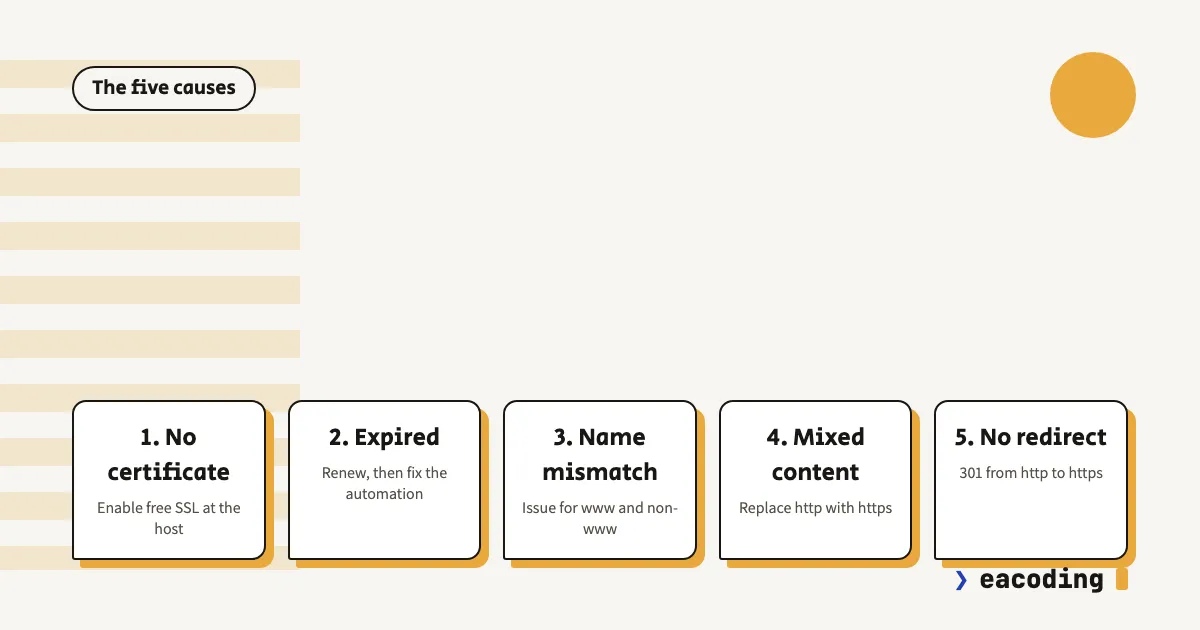
The Five Causes, and What to Do About Each
1. No certificate at all
The site has lived on HTTP since it was built, usually because whoever built it didn't bother, or because the hosting company once charged for a certificate and you decided to postpone. The fix: in the hosting control panel look for SSL, Let's Encrypt or "security certificate", enable it and tick "auto-renew". It's free and a one-time job at most hosts. A host that still charges for a basic certificate in 2026 is a good reason to move hosting. After enabling, go to cause 5, because a certificate without a redirect is half a job.
2. The certificate expired
There was a certificate, it worked for years, and one morning everyone sees a red screen. The classic reason: auto-renewal failed silently. Let's Encrypt renewal verifies that the domain still points at the server, and if you moved DNS, added Cloudflare or blocked something in the firewall in the meantime, verification fails and nobody notices. And you specifically won't get an email about it: Let's Encrypt stopped sending expiry notifications in June 2025 and relies on automation altogether.
The immediate fix: renew from the hosting control panel. The real fix: understand why the automation failed, or you'll be back here in 90 days. And this is about to matter more: the CA/Browser Forum decided in April 2025 to shorten the maximum certificate validity from 398 days to 200 days from March 2026, to 100 days from March 2027, and to 47 days from March 2029. Anyone renewing by hand once a year will find the year ends quickly.
3. The certificate is for a different name
The browser encrypts, but also checks who the certificate belongs to. If it was issued for www.example.com only and the visitor goes to example.com, they get the red screen, and vice versa. Another common version: a new domain pointed at the hosting, and what answers is the hosting company's default certificate, in its own name. The fix: reissue the certificate so it covers both names (most panels do this automatically when you tick both), and redirect everything to one version. Google prefers a single address too. If issuing for www fails, check that a DNS record for www exists at all; without a record there's nothing to validate. And subdomains like shop or app need their own certificate or a wildcard, the main domain's certificate doesn't cover them.
4. Mixed content: the page is encrypted, part of the content isn't
This is the most confusing case, because "we do have SSL". The site really is on HTTPS, but an image in the slider, an embedded video, a font or a chat script is still linked with an address starting in http. Modern browsers try to upgrade such images and videos to https themselves; when the upgrade succeeds you see nothing, and when it fails the component is blocked and the page gets flagged. Scripts over http are always blocked. The classic symptom: a "secure" site with missing images or a widget that won't load. Another variant: a form on an encrypted page that submits to an http address, where Chrome warns the moment you click "send" that the information is being sent insecurely.
The fix in WordPress: first check that the site address in General Settings starts with https. Then run a search and replace in the database (a plugin like Better Search Replace, or WP-CLI if you're comfortable), from http://yourdomain to https://yourdomain, after a backup. Whatever remains is almost always an address pasted by hand into the theme or a widget, and you find it through the browser's developer console (F12, Console tab, look for "Mixed Content"). As a safety net you can add a Content-Security-Policy: upgrade-insecure-requests header, which tells the browser to upgrade every request on its own.
5. There is a certificate, but no redirect
The quietest cause: HTTPS works fine, but anyone arriving from an old link, a business card or by typing the address lands on the HTTP version and stays there. Two versions of the same site, one encrypted and one not. The fix: a permanent 301 redirect from every http address to its https equivalent, at the server level or in the control panel (in most panels it's a switch called "Force HTTPS"). Once the redirect has worked for two weeks without trouble, you can add an HSTS header that tells the browser not to try HTTP at all. Just know what you're switching on: with HSTS, an expired certificate shows a red screen with no "Advanced" button, there is no way around it. It's an upgrade for a site whose auto-renewal works, and a trap for a site that renews by hand.
Summary Table: What You See, the Cause, Where to Fix It
| What the visitor sees | Likely cause | Where to fix it |
|---|---|---|
| Grey "Not secure", page loads normally | No certificate, or no redirect to HTTPS | Hosting control panel: SSL + Force HTTPS |
| Red "connection is not private", mentions expiry | Certificate expired | Renew in the control panel, then find out why automation failed |
| Red screen only with www (or only without) | Certificate for one name only | Reissue for both names + redirect to one |
| Padlock missing on a specific page, images missing | Mixed content | Search and replace http in content and settings |
| Secure when typing https, not secure from a link | No redirect | 301 redirect + HSTS |
| A Wix or Shopify site shows the warning | Domain connection not completed | The builder's control panel: domain verification and DNS |
Does It Hurt You on Google?
Yes, but not the way people think. HTTPS has been a lightweight ranking signal since 2014, and an HTTP site doesn't vanish from the results because of it. The real damage happens after the click: a visitor who meets Chrome's gate or a red screen goes back to the results, and your site got a visit that never happened. If the site isn't producing leads anyway, this is one of the first things to check.
There's another point most business owners don't think about: a contact form on an unencrypted page sends names, phone numbers and sometimes ID numbers in plain text across the network. Amendment 13 to Israel's Privacy Protection Law requires reasonable data security for a database, and an exposed form is not a good example of that. After moving to HTTPS, add a new property in Search Console for the https address, because Google treats it as a separate site, unless you set up a Domain property in advance that covers every version.
How Not to End Up Here Again
- Auto-renewal on, and verified. Not "probably on". Open the control panel and see the next renewal date.
- External monitoring. Most uptime monitoring services, including the free tiers of some, can email you a few days before a certificate expires. A minute of setup, years of quiet.
- Every DNS or hosting change means re-checking. Moved a domain, added Cloudflare, switched servers: that's the moment automatic renewals break.
- Know whose name the certificate and hosting are in. If the only person who can fix it is "the guy who built the site" who doesn't answer, your problem is bigger than a certificate, and this checklist will help.
All of these are exactly the kind of thing website maintenance is supposed to cover, and one of the reasons I insist on certificate monitoring for every site I'm responsible for.
Two Traps Worth Knowing
Cloudflare in "Flexible" mode. This mode encrypts between the visitor and Cloudflare, but not between Cloudflare and your server. The visitor sees a padlock, the data travels half the way exposed, and when you add an HTTPS redirect on the server you get an infinite redirect loop. Choose "Full (strict)" and install a real certificate on the server.
The complaining page isn't yours. Sometimes the warning comes from a builder, a booking system or a third-party landing page embedded in the site. If one fix after another doesn't help, check which domain the problematic content actually comes from.
No Control Panel? Wix, Shopify and Hosted Builders
On Wix, Shopify, Elementor Cloud and the like there is no "hosting control panel", and the certificate is issued and renewed on its own. If such a site shows "Not secure", it's almost always an unfinished domain connection: the DNS records were pointed but the domain wasn't verified in the builder, or only one of the two versions (with www and without) was connected. Go into the builder's domain settings, complete the verification, and wait; sometimes it takes up to a day.
Secure for You, Red for the Customer
It happens, and it isn't always the site's fault:
- The clock on the customer's device is wrong. A certificate is checked against the device's date; a clock that slipped a year back makes every site "not safe". Common on old phones and computers with a dead backup battery.
- A very old device. Android before 7.1 and a Windows that hasn't been updated in years don't know today's certificate authorities, and a perfectly valid certificate looks foreign to them. Nothing to fix on the site.
- Antivirus or an office network intercepting the encryption. Some security software inserts its own certificate in the middle, and sometimes that fails. Test from a mobile network.
- A missing certificate chain. The one case on this list that is yours: Chrome on a computer fills in a missing intermediate certificate by itself, iPhone and Firefox don't. The Qualys test from the first section will reveal it.
And after you've fixed it: the warning doesn't vanish for everyone at the same moment. Browsers remember pages, and CDNs remember versions. A hard refresh (Ctrl+Shift+R, or closing and reopening the browser on a phone) solves most cases, and anyone behind a CDN should purge its cache as well.
Bottom Line
"Not secure" is almost always one of five things, all fixable, most free, and none of them evidence of a hack. The check takes a minute, the fix usually under an hour, and prevention is an auto-renew switch and a monitoring service. And in the Chrome version reaching your customers this month, this is no longer cosmetic.
Site red and you can't find the switch? That's exactly the kind of problem website rescue exists for. Write to me and we'll get the padlock back today.
FAQ
Does "Not secure" mean my website was hacked?
No. The warning is about the connection between the visitor and the site, not about the site's content: it appears when the page loads without encryption (HTTP instead of HTTPS) or when there is a problem with the security certificate. A hacked site looks different - redirects to strange sites, pages you never wrote, Google's red "deceptive site" warning.
How much does an SSL certificate cost?
Usually nothing. Almost every hosting company issues a free Let's Encrypt certificate with one click from the control panel, and it encrypts exactly like a paid one. Paid certificates differ in insurance warranty and organisation identity validation, not in encryption strength.
How often does a security certificate need renewing?
Let's Encrypt certificates are valid for 90 days and renew automatically. Commercial certificates were issued for 13 months until recently, but since March 2026 the maximum validity dropped to 200 days, in March 2027 it drops to 100 days, and in March 2029 to 47 days. The conclusion: manual renewal is not a plan, only automatic renewal is.
The site is secure, but on one page the browser still complains. Why?
Almost always mixed content: the page itself is on HTTPS, but an image, video or script inside it is still linked with an http address. The browser tries to upgrade them, and when that fails it blocks them and flags the page. The fix is replacing the old addresses with https in the content and settings.
More from the blog
Is an Accessibility Plugin Enough to Comply With Israeli Law?
A floating accessibility widget doesn't make a site comply with IS 5568. What the widget really does, where it fails, why it sometimes hurts, and what does cover you.
7 min readHow to Write a Website Accessibility Statement in Israel (With a Template)
The accessibility statement under Regulation 35: what the regulations require in it, where to put it, what never to write, and a template you can adapt to your site.
7 min readHow Do You Back Up a Website Properly? What, Where, and How Often
A backup that actually saves you: what must be in it (not just files), where never to store it, how often by site type - and how to know it works at all.
6 min read
Reaching me is the easy part.
A few lines in the form if you prefer writing - or straight to the channel you already use. Either way, it's me answering.