Moving to WordPress Without Losing Your Place in Google: The Full Checklist
A platform migration is the project most people underestimate, and it's also where the ugliest drops in traffic happen. Not because the new site is bad - usually it's far better - but because someone treated the site's URLs as a technical detail.
They aren't a technical detail. The URLs are the asset. Every link pointing at you from another site, every page Google has indexed over the last three years, every share on WhatsApp - they all point at a specific address. If that address stops answering, you've lost what it accumulated.
The good news: this sounds frightening and is really just orderly work. Here's the order.
Before Touching the New Site: The URL Map
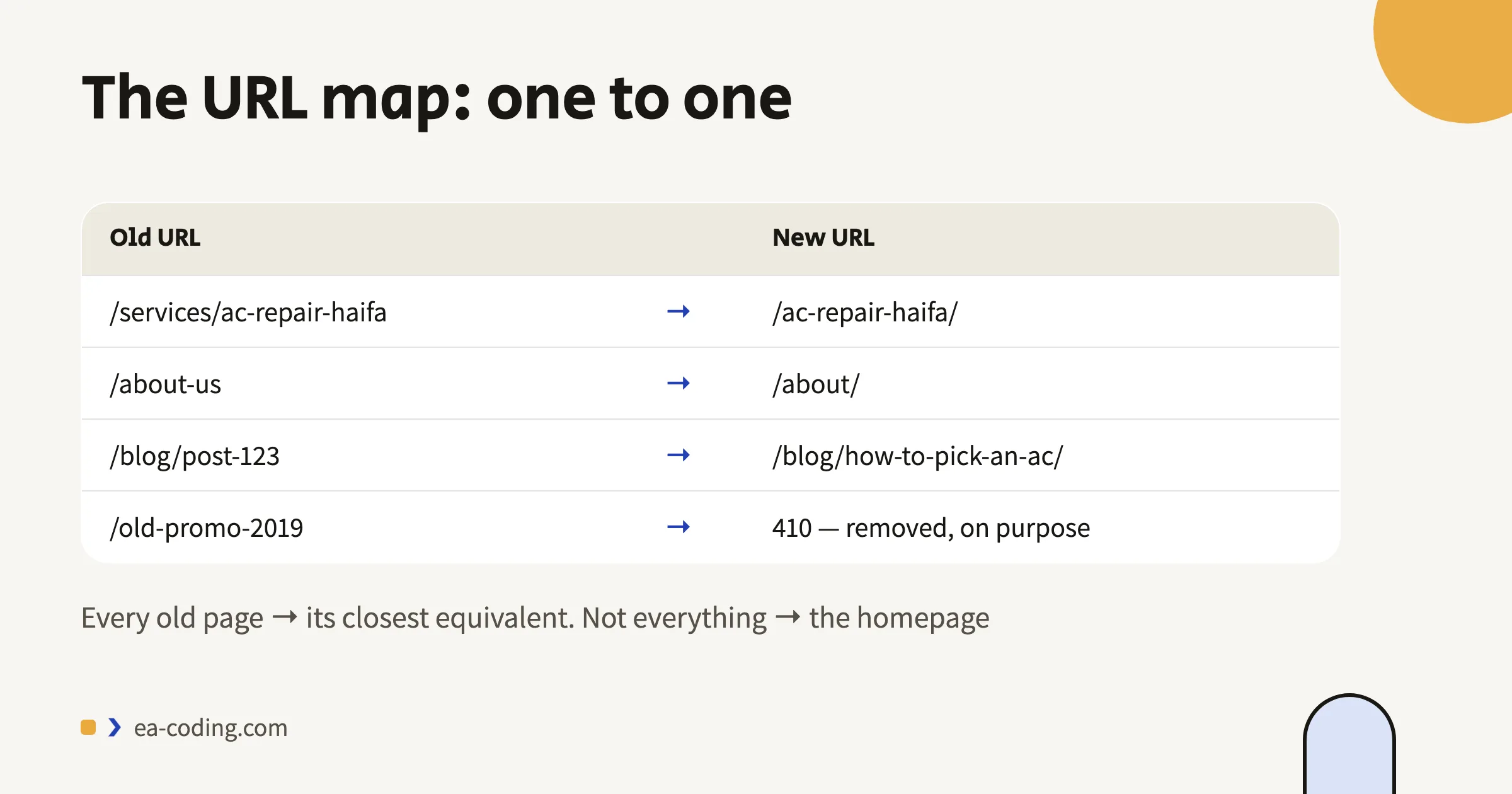
This is the step you can't skip, and the step everyone skips.
1. Export a list of every existing URL. From Search Console (the pages report), from the current sitemap, and from Google Analytics - the pages that got traffic in the last year. The three sources together give a fuller picture than any one alone.
2. Mark the important ones. Not every page is worth the same. Sort by traffic and inbound links. The top twenty pages are 80% of the story.
3. Build a two-column table: old URL → new URL. One row per page. That table is the entire secret of a successful migration.
The rule: one to one. Every old page gets its closest equivalent. A page about "air conditioner repair in Haifa" goes to the page about air conditioner repair in Haifa - not to the homepage.
The Redirects: How to Do a 301 Properly
A 301 is a permanent redirect. It tells Google "this page moved there, pass along what it earned". That's the tool, and there are three ways to get it wrong:
Redirecting everything to the homepage. The classic mistake. Google treats an irrelevant redirect as a soft error, and everything the page accumulated is discarded. If there genuinely is no equivalent, a proper 404 beats a dishonest redirect.
Redirect chains. URL A redirects to B which redirects to C. It works, but it wastes crawl budget and is slow for the visitor. Point straight at the final destination.
Forgetting the variants. With and without www, http and https, with and without a trailing slash. Every variant needs to land on one agreed version. This is an especially common source of quiet faults, and I wrote about that side of it in the indexing guide.
One more rule that saves pain: if you can, keep the existing URL structure. A migration where the addresses stay identical is the safest migration there is.
What Transfers and What Doesn't
What usually transfers fine: text, images, posts, basic products.
What almost always needs manual work: the design (it doesn't transfer, it gets rebuilt), forms and their settings, existing redirects, per-page SEO tags, structured data, and every integration - payments, invoicing, mailing list.
What doesn't transfer at all: the old platform's plugins and apps. Each one needs an equivalent, and it's a good moment to check whether you actually need it.
Also: if you're rebuilding anyway, this is the cheap moment to fix accessibility and speed, because you're already inside the code. Fixing it later is a separate project.
A Week Before Launch
- The new site sits in a staging environment blocked from indexing. Important.
- Every 301 configured and tested - not "should work", actually tested, row by row against the table.
- Accessibility and speed checked on the new site, before rather than after.
- A full backup of the old site. Not just files - the database too, and a copy of the URL list.
- Who holds the domain and who holds the DNS. Find out now, not at the moment of truth.
On Launch Day
- Remove the indexing block. This is the number one launch mistake - the site goes live and stays hidden from Google for weeks.
- Upload a new sitemap and submit it in Search Console.
- If the domain is changing, use Google's Change of Address tool and add the new property.
- Walk the top twenty pages and confirm they load, and that the 301 from the old address reaches them.
A successful migration is measured in the fortnight after, not on the day the site went live. Until then nobody knows what broke.
Two Weeks Later: What to Monitor
- The errors report in Search Console. Growing 404s are URLs you missed in the table. Add a redirect and move on.
- The pages report. Are the new pages entering the index at a reasonable rate?
- Organic traffic against the same period last year, not against last week - so you don't confuse seasonality with damage.
- Speed, on real field data rather than a lab test alone.
And about a drop? A small, temporary dip in the first weeks is normal - Google has to re-crawl and digest the change. A sharp drop that hasn't recovered after a month is a sign something in the URL map didn't close.
If the Domain Changes Too: What to Do With the Old One
A platform migration with a new domain is the riskiest version, and it carries a question that's routinely forgotten - what happens to the old domain once the new one is live.
Don't give it up. Keep it registered and renewed for at least a year, preferably longer - for as long as traffic, links, or people typing it from memory still arrive. An active business's domain released to the market gets grabbed within days, and whoever grabs it inherits every link you accumulated.
The redirects stay live. The old domain keeps 301-ing to the matching addresses on the new one - not to the homepage - for as long as it's registered. A redirect that lapses after six months loses exactly what you were trying to keep.
Update whatever can't follow a redirect: the Google Business Profile, Facebook and Instagram, the email signature, business cards, the sticker on the van. Redirects work in a browser - not on a sign.
And email. If mailboxes lived on the old domain, they need to keep receiving or forwarding. A customer who writes to an old address and gets a bounce assumes you've closed.
One Mistake Worth Avoiding
Don't change everything at once. New platform, new domain, new design and new content structure - all on one day. If traffic falls, you won't know which of the four caused it. If you can, separate them: platform first with the same URLs, then the rest.
The Bottom Line
Moving to WordPress isn't a risk in itself. What's risky is moving without a URL map. With an orderly table, one-to-one 301s and a fortnight of monitoring, you can move without paying for it in traffic - and come out with a site you can take anywhere.
Considering a move? Tell me from what to what, and how many pages - I'll tell you what the URL map needs to cover and the specific risks in your case.
More from the blog
Is an Accessibility Plugin Enough to Comply With Israeli Law?
A floating accessibility widget doesn't make a site comply with IS 5568. What the widget really does, where it fails, why it sometimes hurts, and what does cover you.
7 min readHow to Write a Website Accessibility Statement in Israel (With a Template)
The accessibility statement under Regulation 35: what the regulations require in it, where to put it, what never to write, and a template you can adapt to your site.
7 min readHow Do You Back Up a Website Properly? What, Where, and How Often
A backup that actually saves you: what must be in it (not just files), where never to store it, how often by site type - and how to know it works at all.
6 min read
Reaching me is the easy part.
A few lines in the form if you prefer writing - or straight to the channel you already use. Either way, it's me answering.