Shopify or WooCommerce? A Decision Guide for an Israeli Online Store
Most conversations about an online store open with the wrong question: "which one is better?" Both are good. People run stores on both that sell in the millions. The right question is who runs the store day to day, and what happens when something breaks on a Saturday night.
And in Israel specifically there's a layer no American guide covers: local card processing, tax invoices, local couriers, and Hebrew that has to run right-to-left without falling apart. That's usually what decides it - not the feature list.
The Real Difference, in One Line
Shopify rents you a finished store and takes the technical operation off your hands. WooCommerce gives you the store outright, and the technical operation is yours - alone or with someone like me.
Everything else follows from that.
When Shopify Is the Right Call
- You have no technical person and don't want one. That's the strongest argument, and it's enough on its own. Security, backups, updates and compatibility are not your problem.
- You want to sell tomorrow, not next month. A simple catalogue goes live fast.
- The catalogue is standard. Products, size and colour variants, stock. Exactly what the system was built for.
- You also sell through other channels - Instagram, marketplaces, a physical point of sale.
What you give up: control. Some things simply cannot be changed, and you pay a monthly subscription plus a transaction fee, every month, indefinitely.
When WooCommerce Is the Right Call
- Your logic isn't "product-size-colour". Products sold by the metre, assemblies, quantity-based pricing, made-to-order items, products that depend on each other. Woo wins here comfortably, because everything is open.
- You need to connect to a system you already run - ERP, inventory, POS, loyalty. With open source, any integration is possible.
- Content is part of the sale. Blog, guides, landing pages - all on the same system.
- You want ownership. Your data, your server, and nobody who can change the terms on you.
What comes with that: responsibility. An unmaintained Woo store is a store that will break - not if, but when. I went deeper on the underlying trade-off in the WordPress vs custom guide.
Now the Israeli Part, Which Usually Decides It
Card Processing
This is the first thing I check, before any conversation about design. Israel has several local payment providers, and their level of support differs by platform - some have an official WordPress plugin, some a Shopify app, some one and not the other.
What to do: choose your payment provider first, ask them explicitly which platform they support and how, and only then decide. Stores do get built in full before anyone discovers the payment integration needs a workaround. That order of operations saves a lot of pain.
It's also worth asking about the local payment methods your audience expects, and about instalments.
Invoicing
An Israeli store has to issue a tax invoice. There are several common invoicing systems and all of them have a way to connect - but again, not necessarily to both platforms with equal ease. Make sure the connection is automatic and not "export a CSV once a month," because otherwise it's manual work you'll hate within a fortnight.
Delivery
Self-collection, pickup points, local courier firms, Israel Post. Check how shipping cost is calculated by locality, and how the tracking number gets back to the customer. It sounds like plumbing, but it's exactly what generates "where is my order" enquiries.
Hebrew and RTL
Here I want to be blunt, because this is my field: a theme that wasn't built for RTL doesn't "flip" at the press of a button. It flips about 80% of the way, and the rest - cart, filter bars, breadcrumbs, quantity steppers - comes out mirrored or broken.
What to do: before falling in love with a theme, open its demo, switch to Hebrew, and try to complete a full purchase. If something looks odd in the demo, it will look odd on your store too, just with your products in it.
Nobody abandons a cart because of the platform. They abandon because of a long form, unclear delivery, and a site that's slow on mobile.
What Shopify Actually Costs - and Why Israel Is Different
This is the part it's hardest to get a straight answer on, so here are the figures as they appear on Shopify's official pricing page as of August 2026. Prices are in US dollars and do change from time to time - always worth checking the pricing page before deciding.
| Plan | Billed monthly | Billed annually | Third-party gateway fee |
|---|---|---|---|
| Basic | $39/mo | $29/mo | 2% |
| Grow | $105/mo | $79/mo | 1% |
| Advanced | $399/mo | $299/mo | 0.6% |
| Plus | from $2,300/mo | - | 0.2% |
There are no setup fees on any plan, and there's a short trial period before billing begins.
And Here's the Part Most Guides Miss
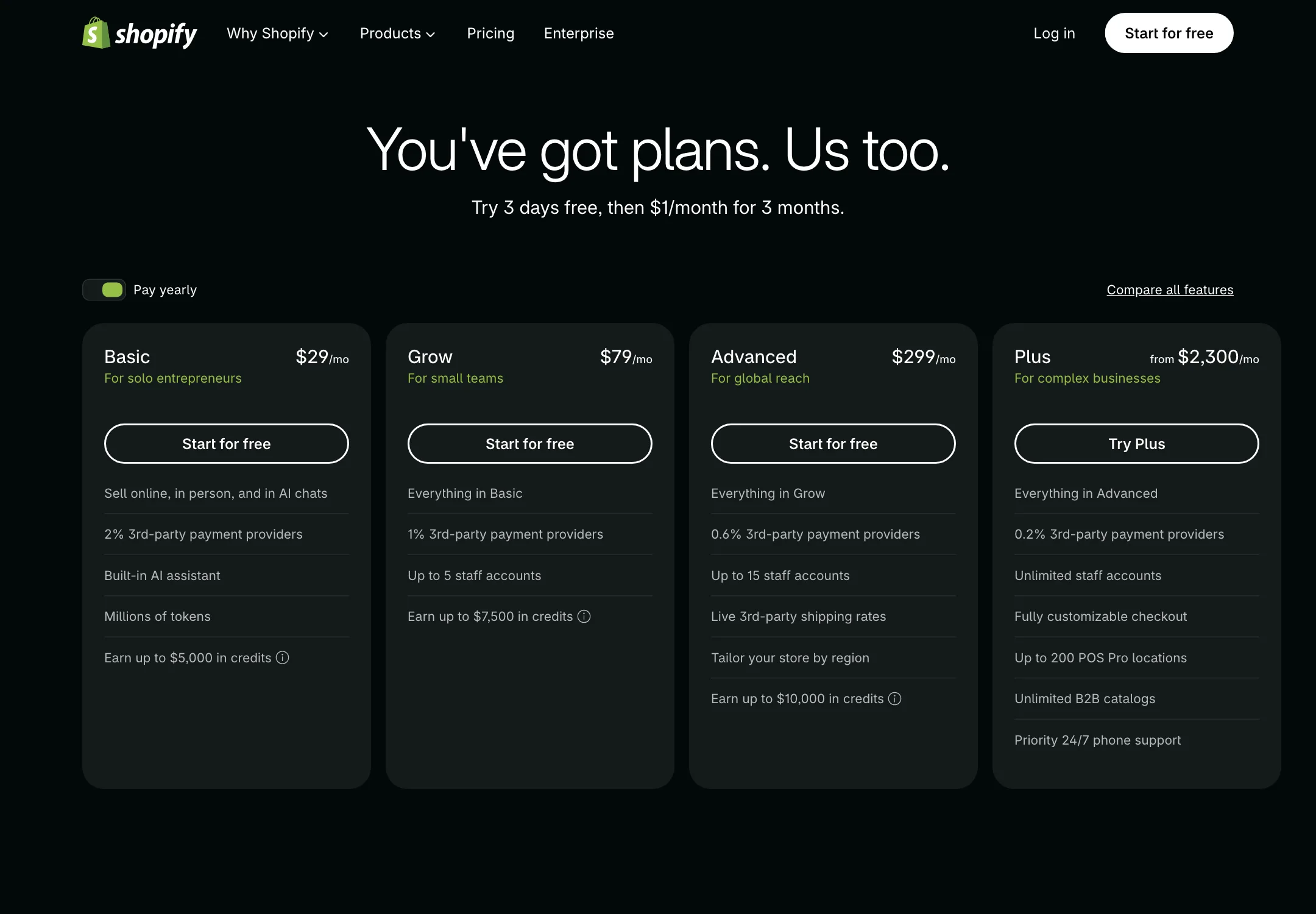
That last column isn't a footnote - in Israel it always applies.
Shopify runs its own processing system, Shopify Payments, and merchants using it don't pay that fee. But it's currently available in 49 countries, and Israel isn't one of them. The practical consequence for an Israeli store: you must use a local payment provider, so Shopify's additional fee - 2% on Basic, 1% on Grow, 0.6% on Advanced - always applies to you, on top of whatever the Israeli provider charges in its own right.
Do that arithmetic before choosing a plan, because it changes the picture: on a store with serious turnover, the gap between 2% and 1% can justify moving up a tier on its own. And against WooCommerce, which has no extra fee layer sitting above the gateway, this is exactly where the real difference appears.
The Question Nobody Asks on Day One: How Do You Leave
A platform gets chosen as if it's forever, but businesses change: the catalogue grows, an integration becomes necessary, or the monthly subscription starts feeling heavy. It's worth knowing in advance what leaving each one looks like.
Leaving Shopify: the content exports - products, customers and orders come down as orderly files. What doesn't leave with you: the design, the apps and their settings, and the history inside those apps. Moving out means rebuilding the store around your data.
Leaving WooCommerce: the site lives with you, so "leaving" usually means changing hosts or changing systems - all under your control, full database included.
In both cases, what most determines how much the move hurts isn't the platform - it's the URLs. I broke that down step by step in the migration guide that doesn't lose Google.
The practical takeaway: if there's a fair chance you'll want out in two years, prefer the platform that's cheap to leave - or at least keep a simple URL structure you can carry forward.
What Matters Less Than You Think
"Which is faster?" Neither. Both can be fast and both can be slow - it depends on images, theme, and how many add-ons you piled on. A clean Woo store will beat an app-heavy Shopify store easily, and the reverse is just as true. I wrote about what actually slows sites down in the speed guide.
"Which is better for Google?" Both are fine. Structure, content and speed decide it - not the platform's logo.
"Which is cheaper?" Depends on the horizon. Shopify is a fixed, predictable monthly cost - the figures are above, and don't forget the third-party gateway fee. Woo has fewer fixed payments and more dependence on maintenance - which also costs, in money or in your time. An unmaintained store isn't a cheap store, it's a store waiting for an incident.
How I Actually Decide
Three questions, in this order:
- Who maintains it? No good answer → Shopify.
- Does the catalogue break the standard mould, or need to connect to an existing system? Yes → WooCommerce.
- Which of the two does your payment and invoicing provider support properly? That answer breaks the tie.
That's it. There is no fourth question.
The Bottom Line
The platform isn't what determines whether the store succeeds. Good product photography, honest descriptions, clear delivery, a fast site on mobile and quick replies to enquiries will determine that. The platform only has to stay out of the way.
Weighing it up? Send me what you sell, who you sell it to, and who'll be running it - I'll tell you which of the two I'd build it in, and why. If the answer is the one I build in less often, I'll say that too. You can also start from the online stores page and see what it looks like in practice.
More from the blog
Is an Accessibility Plugin Enough to Comply With Israeli Law?
A floating accessibility widget doesn't make a site comply with IS 5568. What the widget really does, where it fails, why it sometimes hurts, and what does cover you.
7 min readHow to Write a Website Accessibility Statement in Israel (With a Template)
The accessibility statement under Regulation 35: what the regulations require in it, where to put it, what never to write, and a template you can adapt to your site.
7 min readHow Do You Back Up a Website Properly? What, Where, and How Often
A backup that actually saves you: what must be in it (not just files), where never to store it, how often by site type - and how to know it works at all.
6 min read
Reaching me is the easy part.
A few lines in the form if you prefer writing - or straight to the channel you already use. Either way, it's me answering.