Build Your Own Website with Wix or AI, or Hire a Developer? An Honest Answer
Let's start with a reverse disclosure: I make a living building websites, which means I have an obvious interest in telling you "don't build it yourself". Which is exactly why I'm going to say the opposite wherever it's the truth - the worst recommendations I've seen were given by people selling the solution they recommended.
So let's sort it out: when Wix, Squarespace or an AI site builder is exactly what you need, where the limit runs, and what the decision really costs - because it does cost, just not where people look.
When DIY Is the Right Call
I say this to people who call me, so there's no reason not to write it: there are situations where a developer is simply an unnecessary expense.
- You're testing an idea. A new business, demand not yet proven, and you need basic presence fast. A builder gives you that in a weekend, and that's exactly its job.
- The site is a sign, not a tool. A few pages, a phone number, a map, a gallery. If all the site must do is say "we exist and here's how to find us" - a builder is enough.
- No budget, but time to learn. A decent builder site beats no site, or worse - a "coming soon" promise stuck for a year.
- A hobby, a community, a one-off event. Not every website is a business asset, and not everything justifies a project.
If you recognized yourself - honestly, build it yourself. Come back to this article when the business grows.
What AI Site Builders Genuinely Do Well
The current generation of these tools is impressive, and anyone dismissing it simply hasn't tried: you describe the business in a few sentences and get a site with a reasonable structure, starter copy and fitting stock images. As a first draft of a digital presence - it's real magic.
What they truly do well: they save you the blank page. Instead of staring at "what do we write in About", you have a starting point to edit from. And editing itself became comfortable - drag, replace text, publish in a click.
What matters to understand: the AI generates more or less the same site for every salon and every law firm. The starting point is fast, but it's generic by definition - it was produced from the same patterns everyone gets. That's no problem when you need a sign; it's a problem when you need to stand out.
The Five Walls You Meet After Six Months
The problems don't show on setup day - they show when the business starts leaning on the site. These are the walls I meet with people who come to me after a year on a builder:
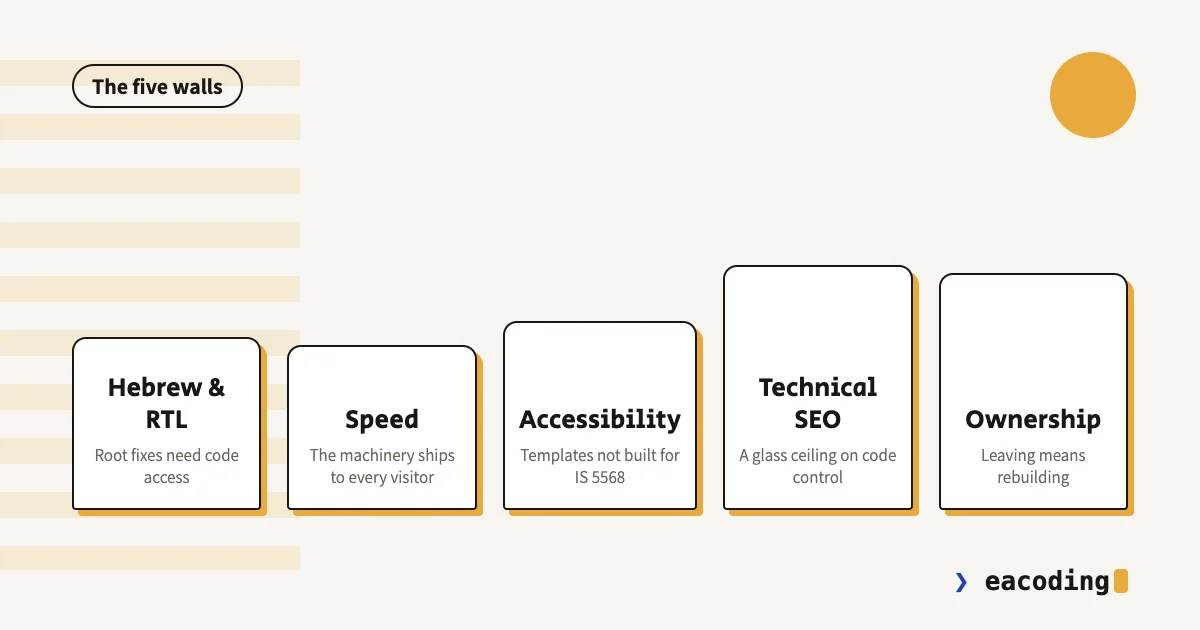
Wall 1: Hebrew and RTL
These templates and tools were built in English, left to right. Hebrew works - but "works" isn't "works well": punctuation jumping to the wrong side, numbers and Latin words flipping, layouts falling apart when text runs long. You can chase every corner, but you have no access to the code that fixes it at the root.
Wall 2: Mobile Speed
A builder ships its whole machinery to every visitor - that's the price of "everything in a visual interface". The result is sites that are very hard to bring to good speed scores, no matter how much you compress images. Why that matters to the business (hint: leads) - in the speed guide.
Wall 3: Accessibility and IS 5568
Most business websites in Israel must meet the accessibility standard, and the legal responsibility is yours - not the platform's. Builder templates weren't built for the Israeli standard, and when something's wrong, your ability to fix it ends where the interface ends. What the law actually requires - here.
Wall 4: Technical SEO
The basics exist in every modern builder: titles, descriptions, a sitemap. But when you need to go deeper - custom structured data, control over the page's code, fixing what an audit tool found - you hit a glass ceiling. And in an era where chatbots recommend businesses too, the sites that win are the ones you can tune precisely.
Wall 5: Ownership and Portability
The most important wall, because you meet it last: a builder site cannot be taken with you. You can export texts and images, but the site itself - structure, design, everything - stays on the platform. Leaving means rebuilding from zero. That's a consideration for day one, not year three. More on the ownership principle - in "who really holds your website", and if you're already at the migration point - here's how to move without losing Google.
The Real Cost Isn't the Subscription
The usual comparison - a monthly subscription versus a developer's quote - misses the two genuinely large numbers:
Your time. The evenings spent aligning an image that keeps escaping, fighting a template that refuses right-to-left, figuring out why the form doesn't send. A business owner who spends dozens of hours in a builder paid more for the site than any quote - just without an invoice to remind them.
The cost of what doesn't happen. Leads that never arrived because the site is slow, a customer unconvinced because the site looks like everyone's, a legal letter about accessibility. None of it shows up anywhere, which is exactly what makes it expensive.
That doesn't mean a developer always pays off - it means comparing correctly: not "subscription versus invoice" but "what is this site supposed to return, and what's blocking it from returning it".
The Quick Decision Table
| Your situation | The honest recommendation |
|---|---|
| Testing a new business idea | A builder, no hesitation |
| Small business, the site is a sign | A builder, and invest the savings in your Google profile |
| The site is supposed to bring customers | A developer, or at least a consult first |
| Selling online | A real commerce platform, details here |
| Must meet the accessibility standard | A developer building to the standard, not an off-the-shelf widget |
| On a builder and the business grew | Time to talk - by choice beats under pressure |
And the rule I already wrote in the WordPress vs custom guide, because it holds here too: a builder is a good choice when the site doesn't need to grow. If there's a fair chance it does - start with something you can take with you.
Built on a Builder and Hit a Wall? That's Fine
For the record: a good share of my projects start exactly there - a builder site that served the business faithfully for two years, until the business outgrew it. That's not a failure, that's the script working: the builder did its job when it was right, and now a different tool is needed.
What does matter: reaching that point on your own initiative, with organized content and time to plan - not under duress, after a failed campaign or an accessibility letter.
Wondering where you are on that axis? Tell me about the business - and if the right answer is "stay on Wix another year", that's exactly what I'll say.
More from the blog
Is an Accessibility Plugin Enough to Comply With Israeli Law?
A floating accessibility widget doesn't make a site comply with IS 5568. What the widget really does, where it fails, why it sometimes hurts, and what does cover you.
7 min readHow to Write a Website Accessibility Statement in Israel (With a Template)
The accessibility statement under Regulation 35: what the regulations require in it, where to put it, what never to write, and a template you can adapt to your site.
7 min readHow Do You Back Up a Website Properly? What, Where, and How Often
A backup that actually saves you: what must be in it (not just files), where never to store it, how often by site type - and how to know it works at all.
6 min read
Reaching me is the easy part.
A few lines in the form if you prefer writing - or straight to the channel you already use. Either way, it's me answering.