Got a Website but No Customers? Here's How to Find the Leak
"We built a website a year ago, and since then - two enquiries, one of them spam." I hear this sentence about once a week, always followed by the same question: maybe we need a new website?
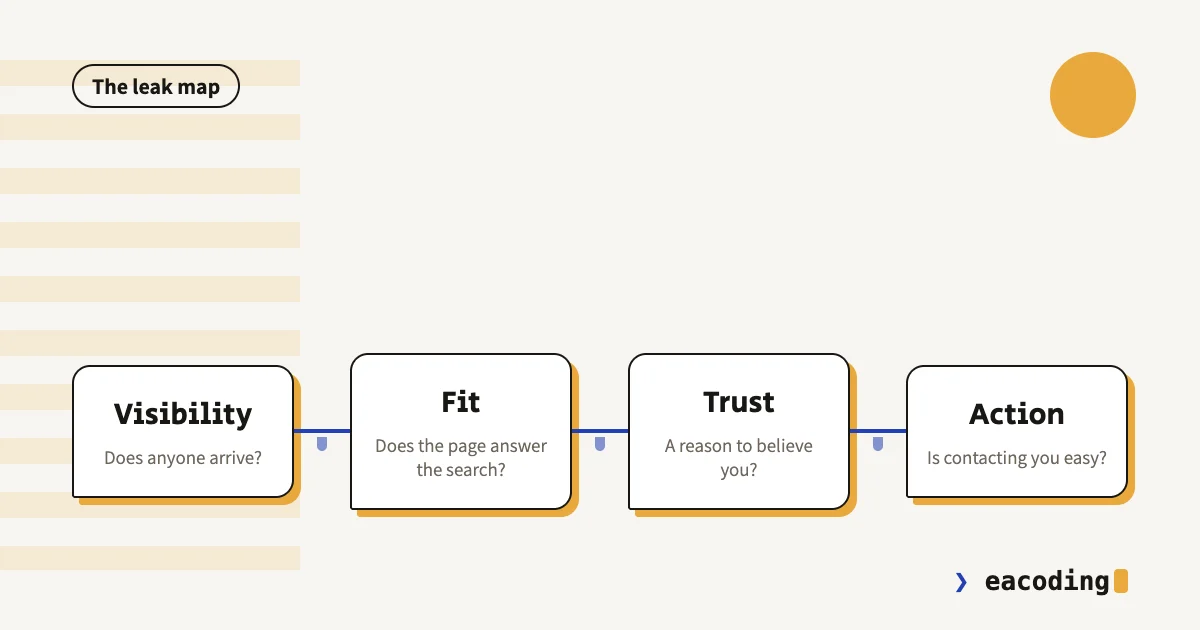
Sometimes yes. But in most cases the website isn't the problem - it's just where the problem hides. A site that brings no customers leaks at exactly one of four points: visibility, fit, trust or action. The good news: you can locate the leak systematically, in about an hour, for free. Here's how.
First: Stop Guessing
The common mistake is fixing by feel: redesigning because the site "looks dated", switching platforms because someone said so, or pouring budget into a campaign while the form is broken on mobile. Any of those moves might be right - but only after you know where the leak is, never before.
Think of it as plumbing: traffic goes in one end, enquiries come out the other. Instead of replacing the whole pipe, you walk along it and test joint by joint.
Step 1: Is Anyone Arriving at All?
Before debating the site's quality, you need one number: how many people visited it last month. You get it from Google Search Console (free, and it shows how people find you on Google) or from whatever analytics tool is installed.
Watch for one important distinction: searches for your business name versus searches for what you do. If all the traffic comes from people who already know you and searched your name - the site isn't recruiting anyone new, it's only serving people who already arrived.
Fewer than a few dozen visitors a month? Your problem is visibility, not conversion. Continue to step 2 and stop there - there's no point polishing a form nobody sees.
Reasonable traffic and zero enquiries? Skip to step 3. The leak is inside the site.
Step 2: No Traffic - a Visibility Problem
Three causes cover most cases, in order of frequency:
The site isn't indexed, or is blocked. Sounds extreme, but I find it again and again: a noindex tag forgotten from development days, a robots.txt blocking everything, a domain switched without redirects. How to check and fix - in the "website not showing in Google" guide.
You're a local business, and the game is on the map. A salon, a clinic, a restaurant, a lawyer - whoever searches for you sees the map first and regular results second. If your Google Business Profile is neglected, the best website in the world won't be seen. The local SEO guide explains what actually moves things there.
The site has nothing to show up for. Five generic pages ("About", "Services", "Contact") give Google no reason to surface you when someone searches for an answer. Whoever searches "how much does X cost" or "how to fix Y" finds the person who wrote about it. That's exactly what professional content is for - and it works with the new search engines too: some of my own leads now arrive through a chatbot's recommendation, not through Google.
Step 3: Traffic but No Enquiries - Four Leaks
Now you walk the pipe. The order here is deliberate - most common leak first.
Leak 1: The Page Answers a Different Question
A visitor who searched "real estate lawyer in Haifa" and landed on a homepage about "comprehensive legal solutions" - gone. The match between what the person searched and what the page says in the first seconds is the real conversion; everything else is decoration.
Quick test: open your most-visited page and ask - is it clear within five seconds what we offer, for whom, and what to do next? If you have to scroll to understand, the leak is here.
Leak 2: No Reason to Believe You
A new visitor doesn't know you, and hesitation always beats curiosity. What closes the gap: names of real clients, work people can see, a human face and name, a visible address and phone number. A site with none of these feels like a business without a sign.
And one trust signal people ignore: the site itself. A layout broken on mobile, an expired security certificate, "© 2019" in the footer - all of it tells the visitor "nobody maintains this", and they project that straight onto the business.
Leak 3: The Site Is Slow on Mobile
Most of your visitors arrive on a phone, and their patience is measured in single seconds. A slow site loses people before they even saw what you have to say - a leak that shows in no report, because whoever left leaves no trace.
The check takes a minute: run your address through PageSpeed Insights and look at the mobile score. What kills speed and how to fix it without rebuilding - in the full speed guide.
Leak 4: Contacting You Is Too Hard
A visitor arrived, got convinced, wants to talk - and now the site makes it hard: a form with eight fields, no WhatsApp, the phone number buried at the bottom of a separate contact page. In Israel, a site without a prominent WhatsApp button simply forfeits a share of enquiries up front.
The rule: from any point on the site, contact should be one tap away, in the channel the visitor picks - a call, WhatsApp or a short form. If you run a paid landing page, the seven classic mistakes are broken down in the conversion guide.
The One-Hour Audit
Here's the full pass, in this order:
- Ten minutes: Search Console - is there traffic? Branded or generic? (step 1)
- Ten minutes: Google your service + your city, in incognito. Where are you? Who is there instead?
- Five minutes: PageSpeed Insights on the homepage and your most important page, mobile.
- Twenty minutes: walk through the site on your phone, as a customer: from search to sending an enquiry. Write down every point of friction.
- Fifteen minutes: fill in your own form and send it. Did an email arrive? How fast? To whom?
That last item sounds redundant, until you discover the form sends to a mailbox nobody has opened since 2023. It happened. More than once.
When the Problem Isn't the Website at All
Honesty requires it: sometimes the plumbing is fine and the well is dry. If you're in a market with no search demand - a new product nobody knows exists yet, or a field that runs entirely on referrals - the website won't create demand out of nothing. It can only capture existing demand and convert it. In that case the right investment is in channels that create demand, with the site as the closing station.
Also: an excellent website won't rescue an uncompetitive price or an unclear offer. That's not a technical fix, it's a business conversation - but it matters to recognize that's the situation before spending more on "improving the site".
What to Fix First
By return on an hour of work, highest to lowest:
- Blocking faults: noindex, a broken form, a site that won't load. Minutes to fix, night-and-day effect.
- An immediate contact channel: WhatsApp button + visible phone on every page.
- Message fit on the main pages: what, for whom, what to do now - above the fold.
- Mobile speed: images, scripts, hosting.
- Trust: work, names, faces.
- Content that attracts searches: the long game, and the one that pays back most over time.
Bottom Line
A website that brings no customers is not fate, and not necessarily a reason to rebuild. It's a series of checks any business owner can run alone, in an hour, for free - and come out with an ordered fix list instead of a gut feeling.
Went through everything and still can't find the leak? Send me the site - I'll go over it and tell you exactly where I'd start, even if the conclusion is that you don't need me.
More from the blog
Is an Accessibility Plugin Enough to Comply With Israeli Law?
A floating accessibility widget doesn't make a site comply with IS 5568. What the widget really does, where it fails, why it sometimes hurts, and what does cover you.
7 min readHow to Write a Website Accessibility Statement in Israel (With a Template)
The accessibility statement under Regulation 35: what the regulations require in it, where to put it, what never to write, and a template you can adapt to your site.
7 min readHow Do You Back Up a Website Properly? What, Where, and How Often
A backup that actually saves you: what must be in it (not just files), where never to store it, how often by site type - and how to know it works at all.
6 min read
Reaching me is the easy part.
A few lines in the form if you prefer writing - or straight to the channel you already use. Either way, it's me answering.